Free & Open Source MIT License

TWSStarter

A small desktop launcher for the Interactive Brokers Trader Workstation (TWS) and IB Gateway. It starts TWS or Gateway, fills in the login automatically, shows a live status per connection, and starts or stops several instances at once — including multiple installations or versions side by side.
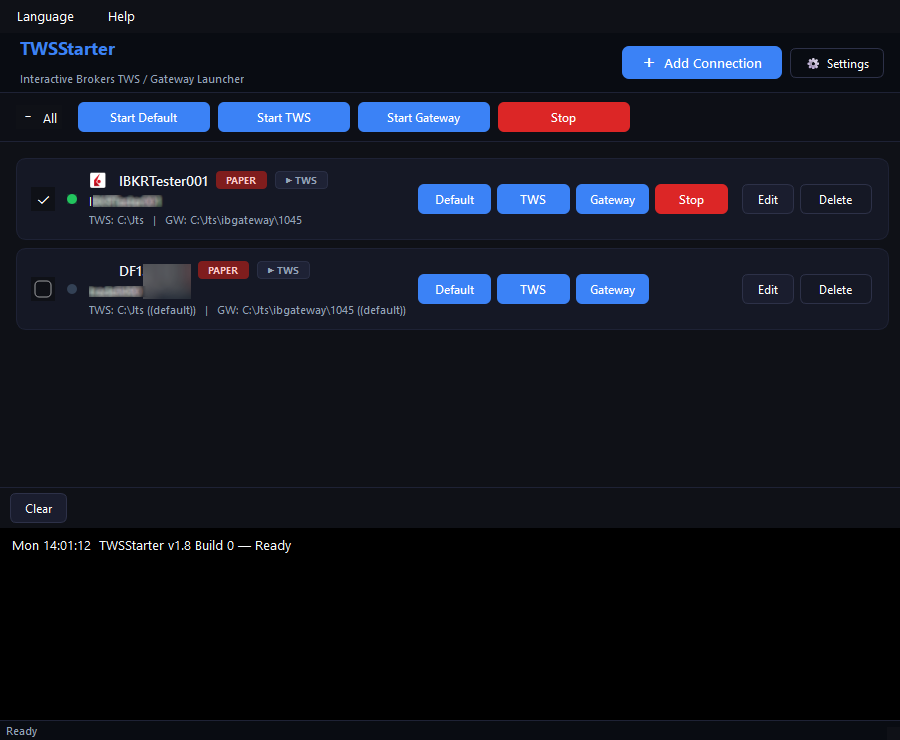
TWSStarter main window: connection cards with start/stop buttons, status display and trace panel

What TWSStarter is — and what it is not

  • A launcher, not a watchdog. TWSStarter launches TWS/Gateway and reports their status. It does not keep them running and does not restart anything if TWS/Gateway crashes or logs off.
  • For 24/7 uptime: TWS Auto Restart. To keep TWS or Gateway up around the clock, enable TWS's built-in Auto Restart (instead of the daily logoff). The exact path is shown below.
  • An independent tool. TWSStarter is not affiliated with, endorsed by, or connected to Interactive Brokers. "Trader Workstation (TWS)" and "IB Gateway" are trademarks of their respective owners.

The convenient path from a double-click to a logged-in trading platform: add a connection → one-click launch with automatic login → keep the live status in view → stop everything at once when needed.

Features

One-click launch

Start TWS or Gateway per connection — or as a batch over all ticked connections (Start Default / TWS / Gateway). Multiple installations and versions run happily side by side.

Automatic login

Username, password and the Live/Paper tab are filled into the TWS/Gateway login dialog automatically. Login-window detection is language-independent.

Encrypted credentials

Passwords are stored encrypted (Fernet / AES) with a key bound to the local machine (Windows MachineGuid). The config cannot be decrypted on a different machine.

Live status display

Detects TWS (by window title) and Gateway (by its API port) system-wide — including instances started in an earlier session or externally. Three honest states per connection: stopped / starting / running.

10 languages

English, German, French, Spanish, Italian, Russian, Dutch, Portuguese, Simplified Chinese and Japanese — with national-flag icons in the language menu. Covers the languages TWS itself ships in.

Trace panel & logs

A colored trace panel shows each step live; plus rotating file logs (5 MB, auto-purged after 3 days). Everything stays local on your machine.

Keeping TWS/Gateway running

TWSStarter does not restart anything by itself. To keep TWS or Gateway online around the clock, use TWS's built-in Auto Restart: instead of the daily logoff, TWS restarts itself at a set time — the session and API stay alive.

TWS → Configuration → Lock and Exit → Auto Logoff Timer → set the restart time and select Auto Restart.

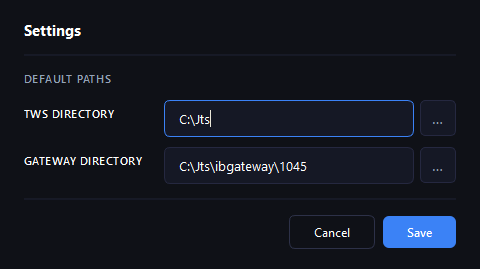
TWSStarter settings: install paths for TWS and Gateway
TWSStarter settings: stored install paths for TWS and Gateway.

Technical requirements

Platform

The UI and launching work cross-platform; autofill and status detection are Windows-only (they use the Win32 API). Prebuilt binaries for Windows and Linux are provided.

From source

Python 3.13+ and uv for dependencies (PyQt6, cryptography, pyautogui, pywinauto). Run uv sync, then uv run python -m twsstarter.main.

Data & privacy

Everything is stored per-user and local: %LocalAppData%\TWSStarter\config.json (settings and connections) plus rotating logs. No telemetry, no cloud.

License

MIT License — © 2024–2026 trade-commander.de. Open source, free, commercial use allowed. The full source is public on GitHub.

Download for free

TWSStarter is open source (MIT) and free. Prebuilt Windows and Linux builds and the full source code live on GitHub.